


We first arrive in the Codex The environment is like sitting in a cockpit and coding. Codex helps us to focus more on the higher level thinking by automating routine tasks. This guided setup explores how to set up a GitHub repo, create a smart workspace, and use Codex for useful engineering tasks.
This is the blank workspace that we will start from. We have not linked any code yet or instructed the assistant, so at this stage, the workspace is waiting patiently for us to take the first step. The interface feels open and clean. We are ready to take the next step in our development.
Then, select the GitHub organisation and repository that Codex will be working with. This time, we selected the “teammmtp” The private repository ai scribe stories was linked to this organization. Codex intelligently filters the repositories to which we have access, so we won’t link accidentally the wrong one. Also, we’re asked if we wish to let the agent use the Internet. For now we have chosen to turn it off, which means Codex will only rely on scripts and local dependencies. The setting works well when you need to create a safe and deterministic environment.

Codex is now introduced as a powerful software engineering agent. This document outlines its four primary capabilities, including drafting GitHub push requests automatically, navigating the codebase and identifying bugs, running lint/tests for code quality assurance, and being powered a finely-tuned, model designed specifically to comprehend large repositories. By clicking a menu dropdown we are able to choose from actions such as creating PRs and copying patches, or applying git command. This makes the workflow smooth and lets us control exactly how to deliver code.
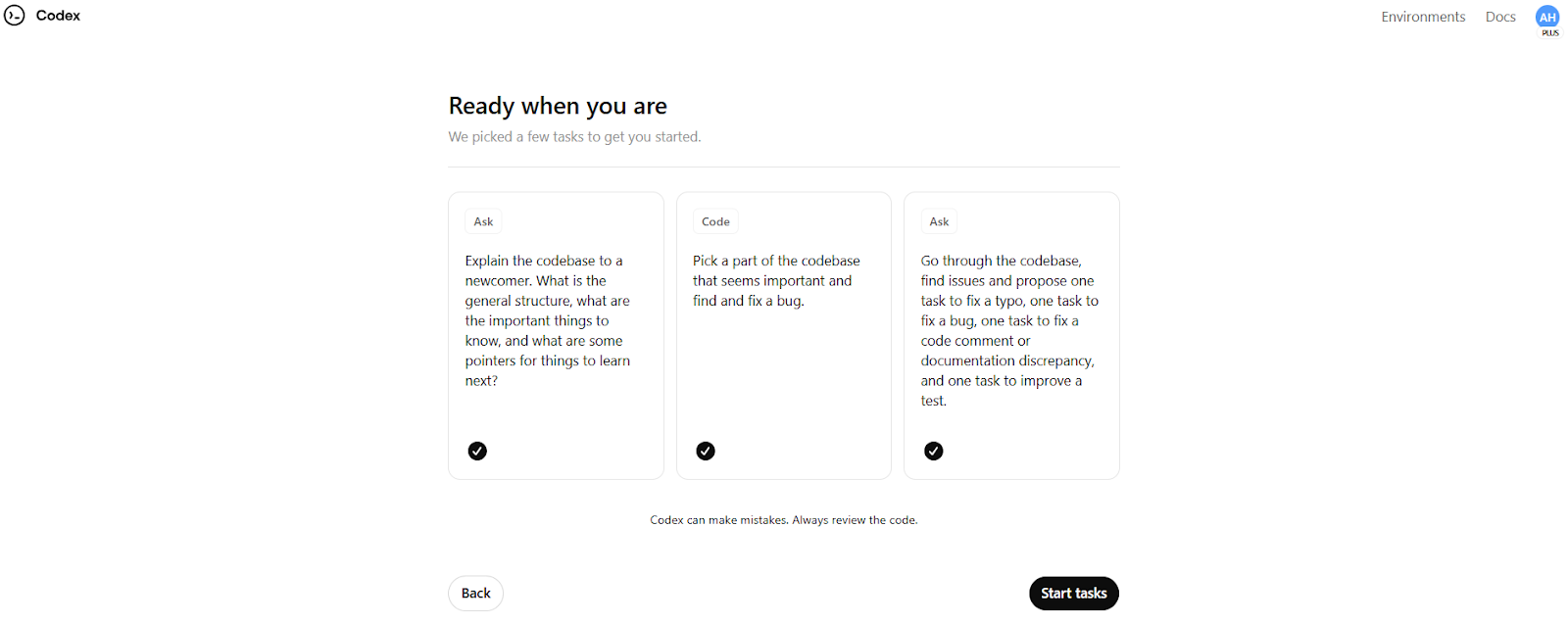
Codex suggests a list of tasks that we can do once our repository and features are ready. Codex suggests that we explain the code structure and identify and fix bugs. We also check for small issues like typos and broken tests. It’s wonderful that Codex can help us break the ice, even if the project is unfamiliar to us. The cards are bite-size onboarding exercises that help us quickly learn and understand the codebase, while also seeing Codex at work. The assistant is ready to start analyzing the code and work with us once we have checked off all three.

We are asked to complete a task in this dashboard. “What are we coding next?”We can now choose what AI will focus on. Choose from three preset options or create our own. Codex also has enabled “Best-of-N,” A feature which generates several implementation suggestions of a given task. This allows us to choose the best one. We have configured our task to be run inside a 1x container and linked the agent with the main branch. This is like telling your teammate. “Here’s the branch, here’s the task, go to work.”

Codex begins digging deeper into the source code. The terminal shows a command that is grepping the codebase for the term “react” In vite.config.ts. The codex does not just assume anything. Instead, it searches for references, finds libraries and other components in our files and creates a complete picture of our tools. This is a dynamic experience, as it feels like you have a smart assistant who’s also methodical and curious.

Codex concludes with a thorough breakdown of the source code and some thoughtful suggestions to improve it. It is revealed that Vite was used to build the project, along with React, TypeScript and Tailwind CSS. This identifies the routing, styles, and toast logic. Also, it tells us where we are lacking in terms of automated testing or realistic data retrieval. They go far beyond reading code; these insights help us to prioritize the tasks that are important and develop a roadmap of how we will evolve the project. Codex’s report also uses file names and component components, showing that the company understands not only our structural, but functional, aspects.
As a conclusion, we have connected GitHub and enabled an AI-powered assistant to read our code, understand its design and suggest ways of improving it. Codex transformed from being a passive assistant to a co-developer who offered guidance, ran commands and generated summaries, just as a skilled colleague would. Codex is a great tool for tackling unfamiliar code. It can help us improve tests, clean up the structure or document logic. Now that we have this set-up, AI can be our code partner and help us build faster.

Sana Hassan is a dual-degree IIT Madras student and consulting intern with Marktechpost. She loves to apply technology and AI in order to solve real-life challenges. He has a passion for solving real-world problems and brings an innovative perspective at the intersection between AI and practical solutions.

