Close Menu
  • AI
  • Content Creation
  • Tech
  • Robotics
AI-trends.todayAI-trends.today
  • AI
  • Content Creation
  • Tech
  • Robotics
Trending
  • In China, a humanoid robot set a record for the half-marathon.
  • Prego Has a Dinner-Conversation-Recording Device, Capisce?
  • AI CEOs think they can be everywhere at once
  • OpenAI’s GPT-5.4 Cyber: A Finely Tuned Model for Verified Security Defenders
  • Code Implementation for an AI-Powered Pipeline to Detect File Types and Perform Security Analysis with OpenAI and Magika
  • TabPFN’s superior accuracy on tabular data sets is achieved by leveraging in-context learning compared to Random Forest or CatBoost
  • Moonshot AI Researchers and Tsinghua Researchers propose PrfaaS, a cross-datacenter KVCache architecture that rethinks how LLMs can be served at scale.
  • OpenMythos – A PyTorch Open Source Reconstruction of Claude Mythos, where 770M Parameters match a 1.3B Transformator
AI-trends.todayAI-trends.today
Home»Tech»Desktop Commander MCP Server: Guide for Users

Desktop Commander MCP Server: Guide for Users

Tech By Gavin Wallace01/06/20252 Mins Read
Facebook Twitter LinkedIn Email
NVIDIA AI Introduces AceReason-Nemotron for Advancing Math and Code Reasoning
Share
Facebook Twitter LinkedIn Email

Desktop Commander MCP Server allows you to perform all of your development tasks in a single chat window. The Desktop Commander MCP Server is a powerful tool that allows all your development operations to be managed in one chat interface.

Desktop Commander MCP has the following features as its core:

Terminal & Process Control

  • Use live output to run terminal commands
  • Run commands and set timeouts in the background
  • Manage sessions to manage long-running tasks
  • Find and stop running processes using detailed information

Configuration management

  • You can set or get server settings, such as:
    • defaultShell (e.g., bash, zsh)
    • BlockedCommands
    • File access via allowedDirectories
    • Enable telemetry
  • Application of changes without restarting server

Filesystem Operations

  • Files with line-based limitations can be read and written.
  • Add or replace file content
  • Directory creation and listing
  • Rename or move files and folders
  • Metadata for files and directories
  • Find files by their name (case is not taken into consideration)

Code & Text Editing

  • Perform precise text replacements (e.g., change config values)
  • Rewrite entire files for major updates
  • Replace patterns in multiple files with a single search
  • Search for code and text quickly with vscode’s ripgrep.

Auditing

  • All actions with time stamps and arguments are recorded
  • To avoid clutter, logs automatically rotate every 10MB.

This tutorial will show you how to connect Claude Desktop with MCP Server and do some other tasks.

Node JS

Node.js includes npx.

  • Node.js Download Latest Version nodejs.org
  • Install the software.
  • Install the software using default settings.

Claude Desktop

Download Claude using https://claude.ai/download.

Configure Claude so that it connects to the MCP server. Click the Open button. claude_desktop_config.json You can open any file that is located in the Claude Installation directory with a text editor. The file can be created manually if the one you’re looking for doesn’t exist. Enter the code below once you’ve opened it:

{
  "mcpServers": {
    "desktop-commander": {
      "command": "npx",
      "args": [
        "-y",
        "@wonderwhy-er/desktop-commander"
      ]
    }
  }
}

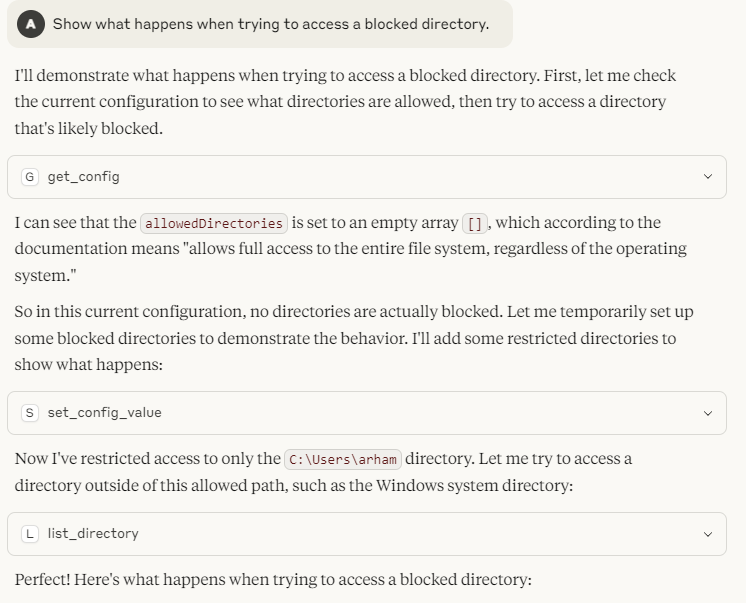
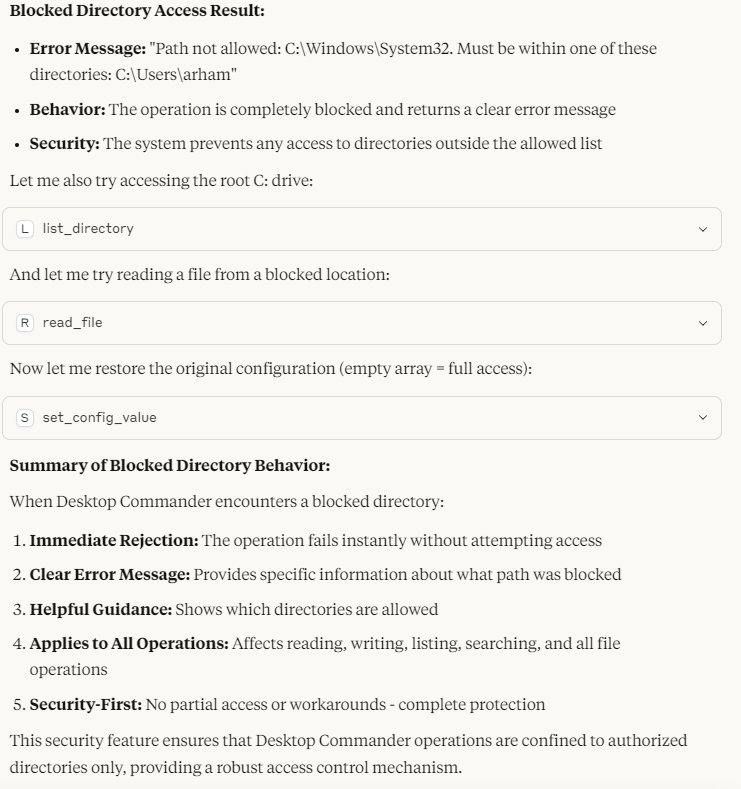
Once MCP is configured, the server should be visible in Claude. Desktop Commander Server is a powerful tool that provides 18 different tools, including file management and terminal execution.
Follow us to stay updated Twitter Don’t forget about our 95k+ ML SubReddit Subscribe Now our Newsletter.


I’m a Civil Engineering graduate (2022) at Jamia Millia Islamia in New Delhi. I’m interested in Data Science and especially Neural networks and how they can be applied in different areas.

Share. Facebook Twitter LinkedIn Email
Avatar
Gavin Wallace

Related Posts

OpenAI’s GPT-5.4 Cyber: A Finely Tuned Model for Verified Security Defenders

20/04/2026

Code Implementation for an AI-Powered Pipeline to Detect File Types and Perform Security Analysis with OpenAI and Magika

20/04/2026

TabPFN’s superior accuracy on tabular data sets is achieved by leveraging in-context learning compared to Random Forest or CatBoost

20/04/2026

Moonshot AI Researchers and Tsinghua Researchers propose PrfaaS, a cross-datacenter KVCache architecture that rethinks how LLMs can be served at scale.

20/04/2026
Top News

Truth Social’s AI chatbot, Donald Trump’s Media Diet Incarnate is the new AI chatbot from Truth Social

DoorDash’s Tasks App is the Future of AI-based gig Work?

AI Is Eliminating Jobs for Younger Workers

Hacking the EU’s new age-verification app takes only 2 minutes

The Judge has halted the designation of Anthropic supply-Chain risk

Load More
AI-Trends.Today

Your daily source of AI news and trends. Stay up to date with everything AI and automation!

X (Twitter) Instagram
Top Insights

Can AI Kill Venture Capitalists?

09/03/2026

YouTube lets you now hide the recommendation popups that appear at the end videos

24/09/2025
Latest News

In China, a humanoid robot set a record for the half-marathon.

20/04/2026

Prego Has a Dinner-Conversation-Recording Device, Capisce?

20/04/2026
X (Twitter) Instagram
  • Privacy Policy
  • Contact Us
  • Terms and Conditions
© 2026 AI-Trends.Today

Type above and press Enter to search. Press Esc to cancel.